.webp)
Digital printers output sheets. A roll plotter is built for a roll of vinyl. A sheet cutter machine sits between those two: it takes the printed sheet and cuts stickers, labels, tags or a small box outline to the file.
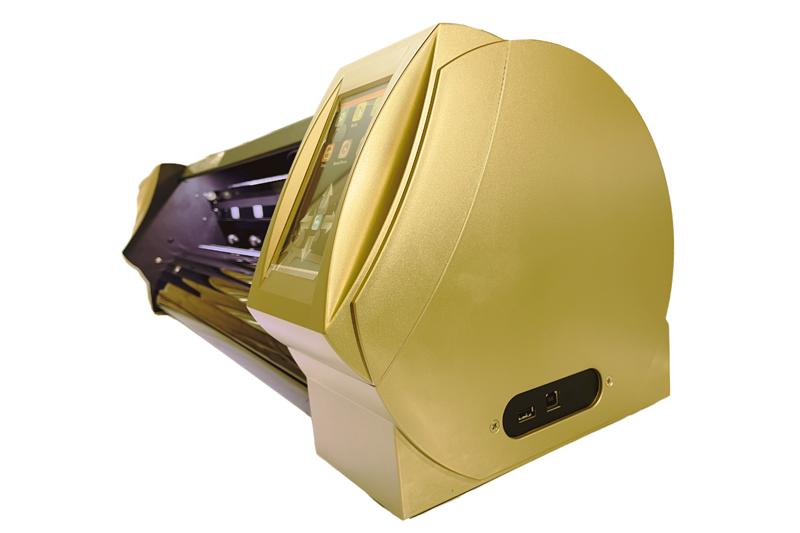
This guide from Skycut India explains what a sheet cutter machine is, how it differs from a vinyl plotter, which jobs it is for, and when the Skycut A3 Max 5 is the right buy.
Quick answer
- A sheet cutter machine cuts loose sheets, not a vinyl roll.
- Typical work: kiss-cut sticker sheets, labels, tags, cards and small creased cartons.
- Skycut sheet cutter machine: A3 Max 5 with auto-feed and dual heads.
- Keep a roll plotter for sign vinyl and radium. Use a sheet cutter machine for printer output.
What is a sheet cutter machine?
A sheet cutter machine is a digital cutter that works on cut sheets of sticker media, label stock, paper or card. The blade follows a vector path from your design file. On stickers it usually kiss-cuts the face and leaves the liner so each sticker peels off the sheet. On packaging it can cut the outline and crease the folds.
Because the media is already a sheet from the printer, the cutter is sized and fed for that format. The Skycut A3 Max 5 is built around A3-class sheets and can pull them from a stack instead of placing every sheet by hand. Feeding itself is covered in the automatic cutter machine guide.
Sheet cutter machine vs roll plotter
| Sheet cutter machine | Roll plotter | |
|---|---|---|
| Media | Cut sheets from a printer | Rolls of vinyl, radium, HTV |
| Typical cut | Kiss-cut sheets, labels, small cartons | Lettering, decals, long stripes |
| Feeding | Single sheet or a stack in a feeder | Roll gripped by pinch rollers |
| Print workflow | Print sheet, then cut | Often cut-only, no print |
| Skycut example | A3 Max 5 | V24 / VH Series |
Many shops own both. The roll plotter does signage. The sheet cutter machine finishes what the digital printer produced.
Jobs a sheet cutter machine handles
Kiss-cut sticker sheets
Many stickers on one liner so the customer peels them one by one.
Labels and tags
Product labels, hang tags and barcode sheets cut to shape.
Cards and invitations
Scored or cut card sheets for short runs.
Small cartons
Cut outline plus crease lines for sample boxes and short-run packs.
Full-colour outlines need registration marks and a camera. Cut styles are explained in vinyl cut machine and kiss cutting.
From printer to finished sheet
Design
Lay out the sheet in your design software with cut lines and, for print jobs, registration marks.
Print at 100% scale on sticker, label or card sheets. Do not use "fit to page".
Load
Place one sheet, or a stack in the auto-feeder, square to the guides.
Cut
The cutter kiss-cuts, through-cuts or creases according to the file. A camera aligns printed sheets.
Finish
Weed the sheet or fold the creased carton. The liner stays with kiss-cut stickers.
.webp)
Printing sheets and cutting them by hand?
Tell us your sheet size and what you cut. We will confirm if a Skycut sheet cutter machine fits and share the price.
Features that matter on a sheet cutter machine
- Sheet size: the bed or feeder must take the sheet your printer already uses.
- Camera: needed when the cut must follow a printed design.
- Kiss cut control: the blade must cut the sticker face and leave the liner.
- Crease tool: needed if the same machine makes small boxes.
- Feeder: worth it when you cut stacks, not one urgent sheet. See automatic cutter machine.
When to buy a sheet cutter machine
- You already print sticker or label sheets and cut them slowly by hand or on a roll plotter.
- Customers want kiss-cut sheets, not individual weeded letters.
- You want short-run cartons without ordering a steel die.
- Sheet jobs are a daily queue, not an occasional extra.
If the work is mostly roll vinyl, start with a vinyl plotter machine instead. Wider machine types are in the cutting machine guide.
Frequently asked questions
Final thoughts
A sheet cutter machine finishes printed sheets: kiss-cut stickers, labels, tags and small creased cartons. The Skycut A3 Max 5 is built for that A3 sheet workflow, with automatic feeding and dual heads. Pair it with a roll plotter if you also sell vinyl lettering and radium.