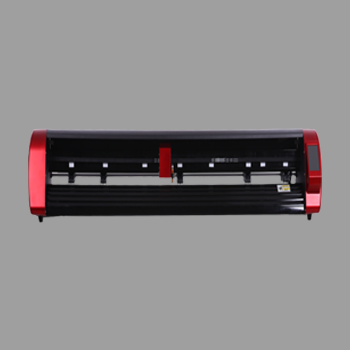
A heat transfer vinyl cutter kiss-cuts HTV so you can weed a design and heat-press it onto fabric. Shops use it for T-shirts, uniforms, sports kits and gifts. The plotter cuts. A heat press applies the film.
This guide from Skycut India shows which features matter and how to choose between the V24 and VH Series. General roll buying is in vinyl cutter. Material overview is in vinyl.
Quick answer
- Must-have: reliable kiss cut on HTV carrier + mirror workflow.
- Best first buy: Skycut V24.
- All-day volume: VH-24 / VH-48 (servo).
- No camera needed for solid-colour HTV from a roll.
What a heat transfer vinyl cutter is
It is a roll cutting plotter used for HTV. You cut the coloured film, leave the clear or translucent carrier, weed the waste, then transfer with heat. The same machine often cuts adhesive vinyl and radium when settings change.
It is not a DTF printer and not a screen-print press. Those put ink on fabric. An HTV cutter shapes vinyl that is pressed on later.
Features that matter
- Clean kiss-cut control so the carrier stays intact for weeding and pressing.
- Stable roll tracking for long names and stacked shirt runs.
- Software that can mirror designs before cutting.
- Force range for HTV – usually low to medium; test each brand. See cutting force.
- Shop support for blades and training in India.
How HTV cutting works
Design and mirror
Create closed shapes. Mirror the artwork for standard HTV so it reads correctly after heat press.
Load HTV carrier-side up
Follow the brand sheet for which side faces up. Keep the roll tracking straight under the pinch rollers.
Kiss-cut a test
Cut a small shape so the blade cuts the HTV face and leaves the carrier. Adjust force before the full job.
Weed the design
Peel waste HTV from the carrier. Keep fine letters attached to the carrier sheet.
Heat apply
Place the weeded design on the garment and press using the HTV brand temperature, time and pressure. Peel warm or cold as the brand directs.
Always follow the HTV brand sheet for press temperature, time and peel (warm or cold). Do not guess heat settings.
Buying a heat transfer vinyl cutter?
Tell us if HTV is your main job or shared with stickers. We will suggest a V24 or VH model and share the price.
HTV cutter vs sticker cutter
| Heat transfer vinyl cutter | Adhesive sticker cutter | |
|---|---|---|
| Media | HTV on carrier | Adhesive vinyl on liner |
| File habit | Usually mirrored | Usually not mirrored |
| Finish | Heat press onto fabric | Peel and stick |
| Camera | Not for solid HTV | Needed for printed outlines |
| Skycut start | V24 / VH | V24 or C / CX |
How to choose
- Confirm HTV is roll-based. Solid HTV does not need a camera or sheet feeder first.
- Start with V24 if shirts share the day with vinyl lettering.
- Upgrade to VH servo when the plotter runs most of the day.
- Budget a heat press separately. The cutter does not apply heat.
- Get a live quote. Call +91 9990391515 or use enquiry.
.webp)
Skycut models
| Model | Choose it when |
|---|---|
| V24 | First heat transfer vinyl cutter for T-shirts, gifts and vinyl lettering |
| VH-24 | Servo drive for daily HTV and roll volume at 24-inch class width |
| VH-48 | Wider servo work for large garment graphics and boards |
Browse the VH Series and send an enquiry for the current price. Wider buying context is in vinyl cutting machine.
Frequently asked questions
Final thoughts
Buy a heat transfer vinyl cutter that kiss-cuts cleanly and supports a mirror workflow. The V24 is the Skycut starter fit. Move to the VH Series when volume rises. Add a camera only if printed transfers become the daily job. For the full process, read HTV vinyl cutting. For general vinyl cutting steps, read cutting vinyl.